
Claude Explorers
Chat, Cowork vagy Claude Code — válaszd azt, ami a feladathoz illik

Munkamódok

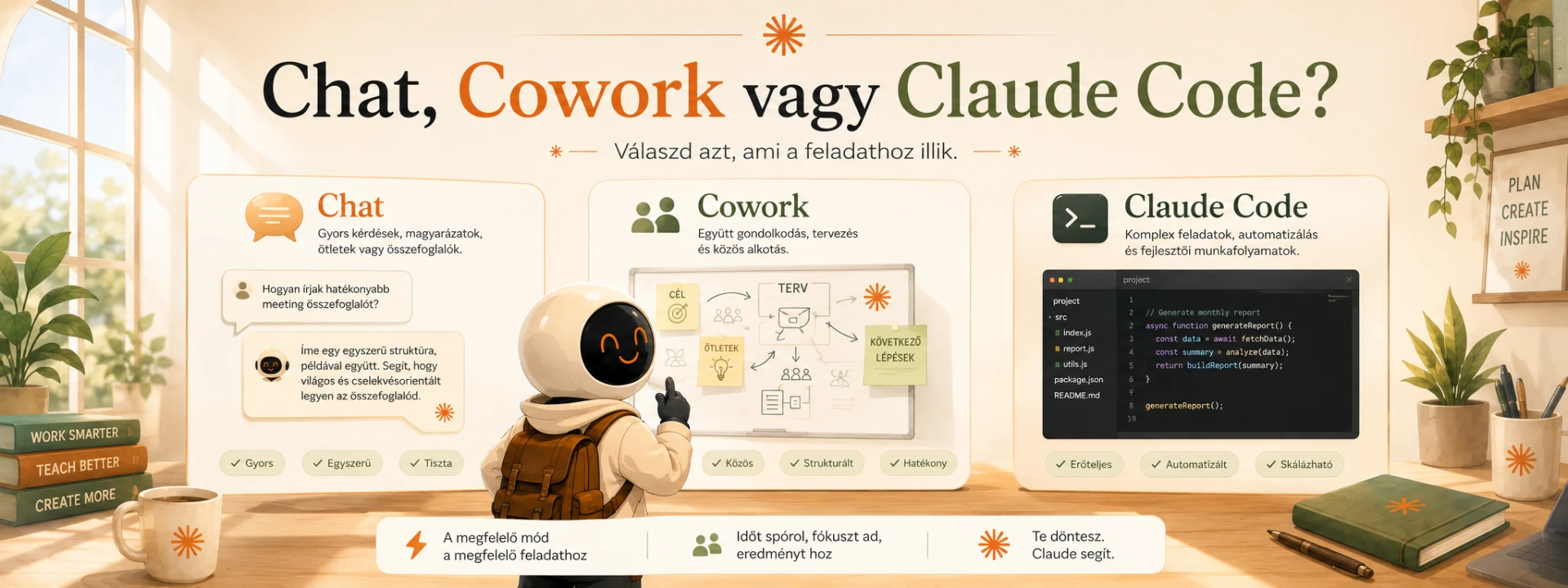
Chat, Cowork vagy Claude Code?

Ugyanaz a modell, három nagyon különböző munkamód. A legtöbb csalódás abból ered, hogy valaki chatben próbál elvégezni olyat, amire a másik kettő való.

Chat

Beszélgetés. Gondolkodás hangosan.

A klasszikus üzenetváltás: kérdezel, válaszol. Minden a szálban él, a végeredményt te másolod ki és teszed a helyére.

  • Kérdés, magyarázat, ötletelés
  • Egy-egy szöveg megírása, átírása
  • Gyors összefoglaló egy feltöltött anyagról
  • Döntés előkészítése, érvek ütköztetése

Ne itt vezess több napos, sokfájlos munkát: a szál hosszú lesz, a korábbi verziók összekeverednek.

Ha a végeredmény egy üzenet, amit kimásolsz — jó helyen vagy.

Cowork

Közös munkatér. Valódi fájlokkal.

Nem beszélgetés, hanem műhely: egy mappában dolgoztok együtt. A Claude beolvassa a benne lévő fájlokat, és kész fájlokat tesz vissza — táblázatot, prezentációt, riportot, vázlatot. A munka a mappában marad, nem egy chat-szálban.

  • Havonta ismétlődő riport, kimutatás
  • Több forrásból összeálló anyag (jegyzőkönyv + tábla + korábbi verzió)
  • Excel, diasor, hosszabb dokumentum előállítása
  • Olyan feladat, ahol a bemenet is, a kimenet is fájl

Egy gyors kérdéshez felesleges — a chat gyorsabb.

Ha azon kapod magad, hogy ugyanazokat a fájlokat töltöd fel újra és újra: Cowork.

Claude Code

Építkezés. Nem csak szöveg, hanem működő dolog.

Fejlesztői felület, de nem csak fejlesztőknek: itt a Claude ténylegesen létrehoz és módosít fájlokat, futtat lépéseket, és eszközöket, mini-alkalmazásokat épít neked. Elmondod, mit szeretnél — ő megcsinálja és kijavítja.

  • Kis belső eszköz: kalkulátor, űrlap, kimutatás-nézegető
  • Sok fájl egyszerre történő átalakítása, átnevezése
  • Ismétlődő technikai munka automatizálása
  • Prototípus egy ötlethez, mielőtt fejlesztőt kérnél

Ne itt írass e-mailt vagy posztot. Túl nagy kalapács ehhez a szöghöz.

Ha a végeredmény egy kattintható dolog, nem egy szöveg — ide gyere.

Képes puskák — mentsd el

Két összefoglaló kép a lényegről. Kattints rá, nyisd meg teljes méretben, és mentsd le — telefonon is kéznél lesz.

Which mode?

Where the work happens. You are in one of these at a time.

A quick question, or an explanation
Chat
Writing or rewriting a piece of text
Chat
The monthly report, from the same files every time
Cowork
Producing a deck or a spreadsheet
Cowork
Building a small tool that has to actually run
Claude Code

And which feature?

These are not alternatives to the modes above. They are switches you turn on inside whichever mode you are already in.

You want the result to be clickable, not pasted
Artifacts
You have explained the same process twice
Skills
You keep uploading the same file
Projects
You want it to read live from Drive or your inbox
Connectors
You are tired of repeating who you are
Memory

Settings worth turning on

01

Model

The one setting worth touching often. Routine work does not need the strongest model, and hard thinking does not survive the fastest one. Never switching is the expensive habit.

02

Thinking depth

Where the switch exists, turn it up for anything with several steps. Slower answer, noticeably fewer mistakes.

03

Web search

On for anything that depends on a price, a date, a law or an event. Open the links anyway: a citation is a claim, not proof.

04

Projects

A separate project for each recurring job: standing instructions, background files, and a clear head. Each project keeps its own memory.

05

Memory

It remembers recurring context so you stop introducing yourself. Look through what it stored now and then, and delete anything you would not want carried into the next conversation.

06

Standing instructions

Language, tone, what to avoid, and one that pays for itself: always ask before starting. Written once, in force everywhere.

07

Connectors

Drive, mail, calendar, notes. Connect only what genuinely belongs there, and remember that a connected tool can carry instructions from whatever it reads.

08

Artifacts

When the answer wants to be a thing rather than a message: a calculator, a checklist, a small page. This is the moment most people first find it surprising.

09

Voice

Speaking is faster than typing for describing a problem, and it works in many languages. Useful when your hands are busy and your head is not.

10

Mobile and browser

The same account on your phone and beside the page you are reading. The browser side panel is for glancing, not for keeping.

Tíz hiba — és mit csinálj helyette

  1. 01Egyetlen óriási beszélgetés, minden témával.

    Témánként külön beszélgetés, visszatérő munkához külön projekt.

  2. 02Mindig ugyanaz a modell.

    Rutinhoz gyors, napi munkához közepes, összetett gondolkodáshoz a legerősebb.

  3. 03Ugyanazt a fájlt töltöd fel minden alkalommal.

    Tedd a projektbe egyszer, és hivatkozz rá néven.

  4. 04Egy hosszú, csapongó prompt.

    Kérd meg, hogy előbb kérdezzen vissza — együtt rakjátok össze a feladatot.

  5. 05Nem adsz példát.

    Mutass egy jó és egy rossz mintát. A példa többet ér tíz jelzőnél.

  6. 06Rövid, homályos kérés.

    Minél pontosabb a kérés, annál kevesebbet kell találgatnia — kevesebb hallucináció.

  7. 07Nincs „rólam” fájlod.

    Egy MD-fájl a szerepedről, hangnemedről, tiltásaidról. Ez a legjobb megtérülésű 20 perc.

  8. 08Minden feladatot nulláról kezdesz.

    Az ismétlődő munkából Skill vagy mentett sablon lesz.

  9. 09Egy promptban öt különböző feladat.

    Bontsd lépésekre, jóváhagyási pontokkal. Hasonlókat viszont nyugodtan kötegelj.

  10. 10Elhiszed az első választ.

    Kérd meg, hogy támadja meg a saját válaszát. Utána döntesz.

Hét nap alatt rendszerré

Az első beszélgetéstől a működő munkafolyamatig. Napi húsz-harminc perc elég hozzá.

1. nap

Rakd le az alapot

  • ·Telepítsd az asztali alkalmazást, ne csak böngészőből használd
  • ·Nézd meg a beállításokat: modell, keresés, mélyebb gondolkodás
  • ·Vezess egy jegyzetet arról, mire használnád hetente

2. nap

Írd meg a „rólam” fájlt

  • ·Ki vagy, mit csinálsz, kinek írsz, milyen a hangod
  • ·Mit nem tűrsz el egy szövegben (hype, felkiáltójel, közhely)
  • ·Mentsd MD-fájlként, és tedd be minden projektbe

3. nap

Kösd be az eszközeidet

  • ·Drive, levelezés, naptár, jegyzetelő — amit tényleg használsz
  • ·Próbáld ki: „nézd meg a múlt heti jegyzőkönyveket és foglald össze”
  • ·Amit nem használsz, azt ne kösd be

4. nap

A promptból legyen Skill

  • ·Válaszd ki azt az egy feladatot, amit hetente megcsinálsz
  • ·Írd le lépésről lépésre, a kimeneti formával együtt
  • ·Mentsd el, és onnantól hívd elő, ne írd újra

5. nap

Dolgozz fájlokkal

  • ·Vigyél át egy valódi feladatot közös munkatérbe
  • ·Bemenet is fájl, kimenet is fájl — ne másolgass
  • ·Nézd meg, mennyi kattintást spóroltál

6. nap

Építs valamit

  • ·Kérj egy kis eszközt: kalkulátort, ellenőrzőlistát, kimutatást
  • ·Nem javaslatot — kattintható dolgot
  • ·Add oda valakinek, és nézd, hol akad meg

7. nap

Legyen belőle rendszer

  • ·A kontextus fájlban él, nem a fejedben és nem a promptban
  • ·Ha valami változik, a fájlt írod át, nem a promptot
  • ·A következetesség többet ér, mint a zseniális prompt

Four models. One Claude.

Different strengths, same thoughtful AI. Choosing between them is the cheapest skill on this site and the least used: most people pick one on their first day and never touch the selector again.

A négy Claude modell robotként, a legkisebbtől a legnagyobbig, mindegyik hátizsákja a lába mellett

Haiku

The quick one. Answers before you have finished reading the question.

  • ·Sorting, tagging, tidying a list
  • ·Short rewrites where you already know what you want
  • ·Anything you will run hundreds of times

Waste: Anything where you would say 'think about this properly first'.

Sonnet

The everyday worker. Where most of your real work belongs.

  • ·Writing and rewriting the things you send to people
  • ·Working through a document you uploaded
  • ·Most of a normal working day

Waste: Rarely wasted. If it is struggling, that is the signal to move up, not to re-prompt a fifth time.

Opus

The one for hard thinking. Slower, and worth it when the problem earns it.

  • ·A decision with several options and real consequences
  • ·Long documents where the answer is buried across sections
  • ·Work you will act on without checking every line

Waste: Reformatting a list, fixing a typo, drafting a two-line reply. It will do it beautifully and you will have paid for thinking you did not need.

Fable

The heaviest. For the problems that defeated everything else.

  • ·Work that runs long and unattended, where you come back to a finished result
  • ·The genuinely hard analysis you would otherwise hand to a specialist

Waste: Almost everything. Reach for it when a lesser model has already failed at the same task, not as a way of taking the problem seriously.

You are about to ask something you have asked fifty times before

Go down a level. Routine work does not get better on a stronger model, it only gets slower and more expensive.

You have re-explained the same thing three times and it still misses

Go up a level instead of rewriting the prompt again. A fourth attempt on the same model usually buys nothing.

You have not touched the model selector in a month

That is the actual mistake. Not the wrong model: the same model for everything.

What Claude is not the right answer to

Every limit here comes with a way out. If this is not the best tool for something, better to learn it here than after two wasted hours.

The Chrome side panel forgets, the desktop app does not

A conversation typed into the browser side panel is not saved. It never reaches your Claude history, its context is not handed to the main Claude, and closing the window ends it. People lose an afternoon of work this way and conclude the feature is not worth using.

Instead Do not start in the side panel. Start in the desktop app and ask it to work in your browser: you get the same browsing ability, but the conversation is an ordinary conversation that lands in your history and can be found again tomorrow. The side panel is for glancing at the page in front of you, nothing you need to keep.

Sometimes another tool is simply the right one

Not every question is a Claude question. For anything anchored in live Google or YouTube results, Gemini is often quicker and steadier. For what is happening on X right now, Grok. Chasing the answer in the wrong tool costs more time than switching would have.

Instead Ask what the answer depends on. If it depends on a live feed one company owns, start where that feed lives, then bring the result back here for the thinking.

It does not make music, video or images

Claude works in words, files and code. It will happily help you plan a video or write the brief, but it is not where the video gets made.

Instead Use a tool built for the medium and let Claude do the part it is good at: the concept, the script, the structure, the review.

A plain script sometimes beats the whole idea

A task that repeats on a schedule and has no judgement in it does not need a model at all. Days can disappear into an automation that is slow, fragile and expensive, when twenty lines of script would have done it and kept doing it.

Instead Ask whether the task involves a decision. If it does not, have Claude write the script, then let the script run on its own. Use the model where judgement is needed, not where repetition is.

The parts that move

These shift with the product. Last checked: 2026-08-17.

The models, by name

Claude is a family of four robots, not one. Haiku is the quick one, Sonnet the everyday worker, Opus the one for hard thinking, and Fable the heaviest. The version numbers move; the shape of the choice does not. The most expensive habit is picking one on day one and never switching again.

How usage is actually counted

Two limits run side by side: a session limit that resets every five hours, and a weekly one. Neither counts messages. What burns through them is length: how long your message is, how large the files you attach are, how long the conversation has already grown, and which model and features you chose. This is why the same number of questions can last all afternoon one day and run out before lunch the next.

Source

A scheduled task only runs without you if you let it

Recurring work can run in the cloud on its own schedule, with your laptop shut. But there is a catch worth knowing before you rely on it: point the task at a folder on your computer and it runs on your computer, which means it only runs when the machine is awake. Leave the folder empty and it runs in the cloud. Paid plans only.

Source